
FishWeather: Marine Forecasts
WeatherFlowWeather
4.8181.00 Reviews
- Version
- 5.0
- Installs
- 100.00K
- Age Rating
- Everyone
Screenshots
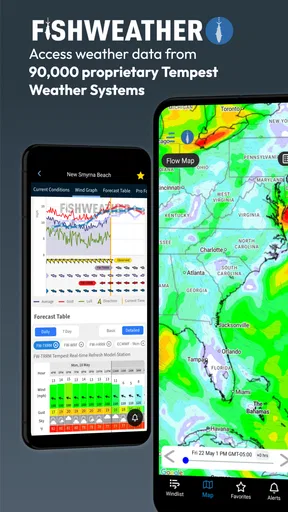
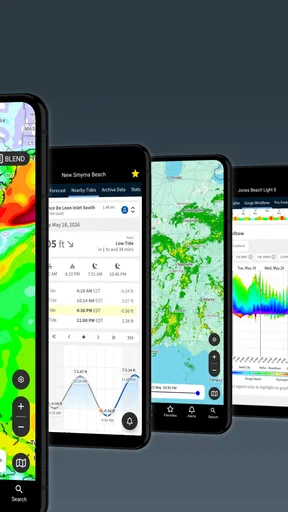
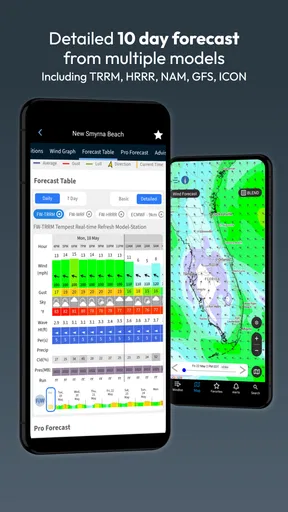
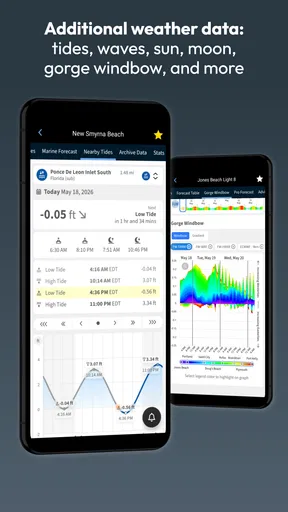
Our Review of FishWeather: Marine Forecasts
 Analysis by Appyee
When I choose a marine weather app, I care less about a crowded screen than whether its information helps me make a sensible call before leaving shore. Wind, waves and tides can each change what a trip feels like, and a forecast that is easy to scan is more useful to me than one that merely displays lots of numbers. FishWeather: Marine Forecasts is built around that kind of planning, so it makes most sense for people whose days depend on conditions on the water.
Start with the decision you need to make
Before relying on any forecast, I’d decide what question I’m trying to answer: Is the planned route comfortable for my boat? Will the wind make fishing difficult? Do the tide times suit the place I want to fish? FishWeather brings marine-focused information together, including forecasts, tides, waves, wind conditions, alerts and radar. That focus is its clearest distinction from a general weather app, which may be handy for rain and temperature but less suited to checking several conditions relevant to a trip at sea.
I also wouldn’t treat any single forecast as permission to go. Conditions can change, and a forecast is a planning aid rather than a substitute for local judgement. My practical habit would be to check before setting out, then look again before committing to a longer trip. If the outlook feels uncertain, I’d keep the route flexible or postpone rather than let a reassuring-looking screen settle the decision for me.
What makes it useful on the water
The app’s strongest case is its marine emphasis. For an angler, sailor or boater, wind and waves are not minor extras alongside the daily high temperature; they can shape the whole outing. Having those details, along with tide information and radar, in one place can make a pre-trip check more focused. WeatherFlow develops the app, and its marine orientation is a better fit for a boat-day decision than a forecast view designed mainly around commuting or outdoor plans on land.
A useful way to read the forecast is to connect the conditions instead of checking each in isolation. A wind forecast may look manageable at the launch point, but I’d still think about how the same outing could feel once I’m exposed on open water. Tide timing matters in a different way: it can affect when a fishing spot or stretch of coast is convenient to visit. These are not reasons to assume the app can decide for me; they’re prompts to ask better questions before I go.
For someone who fishes in different locations, a further advantage of a dedicated marine tool is having a reason to check the conditions at the destination rather than relying on what the sky looks like at home. I’d use it while planning the day, then compare the forecast with what I can actually observe when I arrive. That simple two-step routine is more useful than checking a forecast once and treating it as fixed.
Who may prefer another kind of forecast
FishWeather is not automatically the right choice for everyone who wants weather on a phone. If I mainly need a quick answer about whether to carry an umbrella, a general weather app may be simpler and more relevant. If I’m planning a mountain walk or a city commute, marine conditions are unlikely to be the information I need most. The specialist focus is a strength for water-based plans, but it also means the app is less compelling as an all-purpose forecast choice.
It may also be a poor fit for someone who wants a very simple glance and does not care about tides, waves or wind in a marine context. More information can help an experienced user make a more considered plan, but it can feel like extra work if all I want is a basic daily outlook. I’d choose based on the decisions I actually make, not on how many forecast categories an app can put on screen.
People comparing marine forecast tools should focus on workflow rather than assume all alternatives provide the same detail. A general weather app is often convenient for everyday land forecasts; a dedicated marine app is more useful when the trip depends on water conditions. FishWeather sits in that second group. I’d still check that its presentation suits the waters and habits I care about, because a specialist label alone does not guarantee that every forecast view will suit every boater.
A realistic planning routine
Suppose I’m considering a weekend fishing trip. The night before, I’d check wind and wave conditions for the area I intend to visit, then look at the tide information to see whether my preferred timing makes sense. If the outlook gives me reason to hesitate, I’d consider a shorter outing or another day rather than building the plan around the most optimistic reading. Before leaving, I’d check again and use radar and alerts as part of staying aware, not as a promise that conditions cannot change.
That routine also helps avoid a common planning mistake: looking only at the departure time. A trip has a return journey too, and the conditions later in the day matter just as much to my decision. I’d check the timing across the whole outing and keep enough flexibility to turn back or change plans. The value of a forecast app is not only helping me say yes; it can also help me decide when a no is the smarter choice.
Cost, setup and expectations
The app is free to install, with in-app purchases listed from $5.49 to $179.99 per item. That range is wide enough that I’d check what a purchase actually includes before paying, rather than assume I need an upgrade to get value from the app. A sensible first step is to try the free experience with the kinds of trips I take and see whether its marine information and workflow answer my real questions.
FishWeather has a 4.7 average from around 1,600 ratings, and it has been installed over 100,000 times. Those figures suggest that many people have tried it, but they do not tell me whether it will fit my local waters or how I personally prefer to read a forecast. It is rated for Everyone, and the current version is 5.0, with Android 5.0 as the minimum operating system. I’d check compatibility before downloading if I use an older device.
Switching from a general forecast app does not have to mean abandoning it. I’d keep the everyday app for ordinary plans and use FishWeather when the sea, a tide or marine wind is central to the decision. That division avoids expecting one tool to do everything. If I already have a familiar way of checking conditions, I’d try the marine app on a few routine trips first; the useful test is whether it helps me plan more clearly, not whether it replaces every forecast screen on my phone.
Alerts can be helpful when I’m not actively checking the forecast, but I would not build a safety plan around notifications alone. A phone can be out of reach, a notification can be missed, and changing conditions still call for attention. I’d use alerts as a prompt to recheck the situation, while keeping my own plan and judgement in charge. That is a small but important trade-off: convenience is useful, but it should not create a false sense of certainty.
First Impressions and Features
When I first downloaded FishWeather, I was immediately struck by its clean and intuitive interface. It’s almost like the app was designed with folks like us in mind—those who can't afford to waste time deciphering convoluted screens when we could be out on the water.
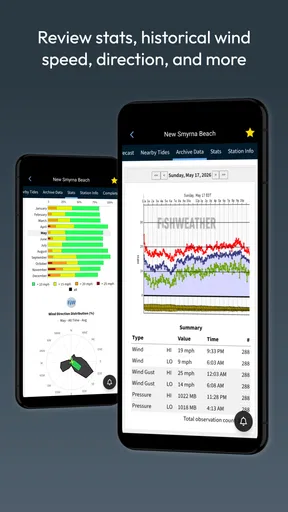
The app offers an extensive range of marine forecasts, which are crucial for anyone venturing out to sea. You get wind speeds, wave heights, tides, and even water temperatures. What’s neat is that all this data is presented in a way that’s easy to digest, even if you're not a meteorologist. Trust me, even on my first go, I felt like I had all the info I needed to make informed decisions.
One feature that I found particularly useful is the real-time weather updates. It’s like having a personal weather station right in your pocket. The app utilizes data from thousands of weather stations, so you know you’re getting the most accurate information possible. Plus, it covers a wide geographical area, which is a bonus if you like to explore different fishing spots like I do.
Customization and User Experience
Another aspect that stood out was the level of customization available. You can tailor the app to show only the data that matters to you. For instance, I’m mainly interested in wind conditions and wave forecasts, so I set up my dashboard to highlight these elements. It saves me time and helps me focus on what’s important.
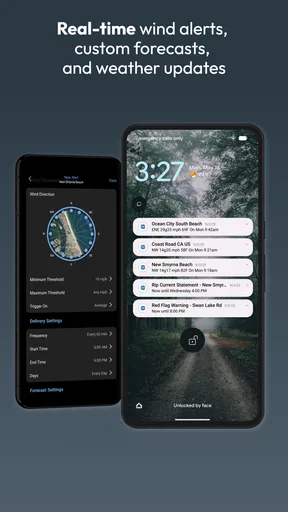
Using FishWeather is a breeze, no pun intended. The navigation is intuitive, and the settings are easy to tweak. I especially love the alert feature, which sends notifications about any sudden changes in weather conditions. It’s like having an early warning system, so you’re never caught off guard.
Community and Connectivity
One of the unexpected joys of using FishWeather is the community feature. You can connect with other users, share reports, and even get tips on the best fishing spots. It’s almost like being part of a secret club where everyone is passionate about the sea and helping each other out. I’ve picked up a lot of handy tips from more experienced users, which has enhanced my trips significantly.
Also, the app’s integration with social media platforms allows you to share your findings and experiences. It’s a fantastic way to keep your friends updated about your adventures and perhaps inspire them to join you next time.
The Final Verdict
In conclusion, FishWeather: Marine Forecasts is more than just an app; it’s a trusty companion that ensures you make the most of your time on the water. Whether you’re a seasoned sailor or a weekend angler like me, having accurate and up-to-date marine forecasts at your fingertips is invaluable.
Overall, I’d say FishWeather is a must-have for anyone serious about their maritime adventures. It’s reliable, packed with features, and easy to use—everything you’d want in a marine forecast app. So next time you’re planning a trip out to sea, make sure you have FishWeather on your phone. You’ll wonder how you ever managed without it.
Verdict
Strengths of FishWeather: Marine Forecasts
- Accurate wind and weather data.
- User-friendly interface design.
- Custom alerts for weather changes.
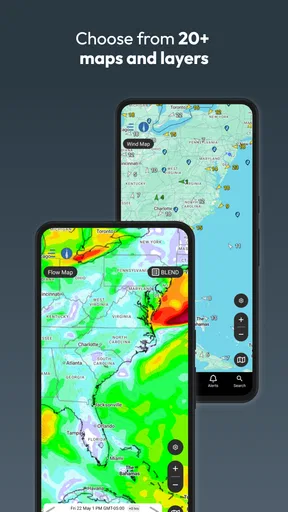
- Detailed marine forecast maps.
- Community-based reporting feature.
Limitations of FishWeather: Marine Forecasts
- Limited offline functionality.
- Subscription required for premium features.
- Occasional data refresh delays.
- Interface can be cluttered at times.
- Limited support for non-coastal areas.
Other Releases by WeatherFlow
View All
Tempest Weather
Weather4.3

WindAlert: Wind & Weather Map
Weather4.7

SailFlow: Marine Forecasts
Weather4.8

iKitesurf: Weather & Waves
Weather4.8
Similar Picks in This Category
View All
Weather - By Xiaomi
Xiaomi Inc.4.1

Weather & Radar Forecast
WetterOnline4.8

Weather
OneLouder Apps4.6

AccuWeather: Weather Radar
AccuWeather3.6

The Weather Channel - Radar
The Weather Channel4.6

1Weather Forecasts & Radar
OneLouder Apps4.3
Frequently Asked Questions
What is FishWeather: Marine Forecasts, and what features does it offer?
FishWeather: Marine Forecasts is an app designed for marine enthusiasts, providing real-time weather updates and forecasts specifically for fishing. It offers features like wind speed and direction, tides, water temperature, and wave height. The app also provides access to live weather stations and detailed maps, ensuring users have all the information they need for a safe and successful fishing trip.
Is FishWeather: Marine Forecasts free to use, or does it require a subscription?
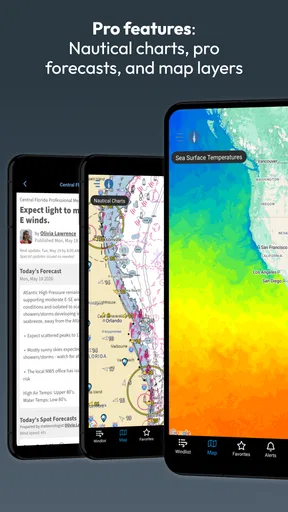
FishWeather offers both free and premium versions. The free version provides basic weather forecasts and access to some weather stations. However, for more comprehensive features like advanced mapping tools, custom alerts, and extended forecasts, users need to subscribe to the premium service. It's advisable to explore the free version first to see if it meets your needs before committing to a subscription.
How accurate is the weather data provided by FishWeather?
FishWeather sources its data from a network of trusted weather stations, ensuring high accuracy in its forecasts. The app frequently updates its data to provide the latest information. While no weather app can guarantee 100% accuracy due to the unpredictable nature of weather, FishWeather is considered reliable by many users, particularly for its specialized focus on marine conditions.
Can I customize the alerts and notifications in FishWeather?
Yes, FishWeather allows users to customize alerts based on their preferences. You can set up notifications for specific weather conditions, such as changes in wind speed or direction, which are crucial for planning fishing trips. This feature is particularly useful for ensuring safety and optimizing your time on the water.
Is FishWeather compatible with both Android and iOS devices?
FishWeather is available for both Android and iOS platforms. It is designed to work seamlessly across devices, providing an intuitive user experience. Users can download the app from the Google Play Store or Apple App Store, ensuring accessibility for a wide range of smartphone users. Regular updates ensure compatibility with the latest operating systems.
